
The Alert Rules API allows you to create, update, list, read, delete, activate, and deactivate alert rules. You must create a JWT using the following scope to use the alert rule API. Go to Creating a JSON Web Token for more information.
Scope Name |
Function |
|---|---|
alertrules:write |
|
alertrules:read |
To create alert rules, use AlertRules/create_api.
Endpoint URL
https://Logpoint-IP/AlertRules/create_api
Method
POST
Request Headers
Content-Type = application/json
Authorization = Bearer <TOKEN>
Parameters
Parameters are data sent with the API request. You must include them in the request body as raw text.
Field |
Type |
Description |
|---|---|---|
object |
Defines the search query, time range, and repos used to retrieve logs to create an alert rule. Mandatory Field. |
|
object |
Rules for triggering an alert. Mandatory Field. |
|
object |
Additional context for the alert rule, including MITRE ATT&CK tags, log sources, and metadata for categorization. Mandatory Field. |
|
object |
Defines the user responsible for the incident. Mandatory Field. |
|
object |
Customizes the incidents obtained from the alert rule, including custom Jinja template, or a simple view. Mandatory Field. |
|
object |
Whether to include raw log data in the alert rule for review. Optional Field. |
|
name |
string |
Name of the alert rule. Must be at least 5 characters long. Mandatory Field. |
description |
string |
Information about the alert rule. Optional Field. |
Search Parameters
Field |
Type |
Description |
|---|---|---|
query |
string |
Query used to search logs. Mandatory Field. |
timerange_day timerange_hour timerange_minute |
integer |
Timeframe within which the search is performed. For example, when the query time range is set to 3 days, Logpoint will search for logs from last 3 days. The time range value must range from 1 minute - 30 days. Add at least one field. |
repos |
string |
List of addresses which must be extracted from the Repos API to retrieve logs to perform search. Mandatory Field. |
limit |
integer |
Maximum number of logs to retrieve using the query. Default is 100. Optional Field. |
flush_on_trigger |
boolean |
Ensure the next alert is triggered only based on a new set of events. Default is false. Optional Field. |
search_interval_minute |
integer |
Search interval in minutes. Must be a factor of the time range. Default is 10. Optional Field. |
delay_interval_minute |
integer |
Wait time before processing logs, used with log_ts searches. Ensures complete data collection. Default is 0. Optional Field. |
throttling_enabled |
boolean |
Prevents multiple alerts for the same values over a period. Default is false. Optional Field. |
throttling_field |
string |
Field name used to apply throttling. Optional Field. |
throttling_time_range |
integer |
Time range (in minutes) to suppress repeated alerts based on throttling_field. Default is 0. Optional Field. |
Incident Condition Parameters
Field |
Type |
Description |
|---|---|---|
condition_option |
string |
Must be one of the following:
Mandatory Field. |
condition_value |
number |
Threshold value for the condition. Mandatory Field. |
risk |
string |
Must be one of the following:
Mandatory Field. |
aggregate |
string |
Must be one of the following:
Mandatory Field. |
Taxonomy Parameters
Field |
Type |
Description |
|---|---|---|
attack_tag_hashes |
array of strings |
List of MITRE ATT&CK tag identifiers (hashes) linked to this alert rule. Optional Field. |
logsources |
array of strings |
List of log sources related to the rule. Optional Field. |
metadata |
object |
Additional metadata as key-value pairs for categorization. Object to enter the field and value of the metadata. Optional Field. |
Incident Ownership Parameters
Field |
Type |
Description |
|---|---|---|
assignee |
string |
Logpoint Username to whom the Incidents are assigned. Mandatory Field. |
visible_to_usergroups |
array of strings |
Name of Logpoint User Group. You can add multiple user groups and they must be added in Incident User Group. Optional Field. |
Incident Display Data Parameters
Field |
Type |
Description |
|---|---|---|
apply_jinja_template |
boolean |
Option to use a custom Jinja template to format the incidents. By default, it is false. Optional Field. |
simple_view |
boolean |
To use a simplified layout when displaying this alert. By default, it is false. Optional Field. |
jinja_template |
string |
Jinja template string for customizing alert rule. Optional Field. |
Four Eyes Parameter
Field |
Type |
Description |
|---|---|---|
original_data |
boolean |
If true, includes raw logs in the alert rule for review. By default, it is false. Optional Field. |
Request Example
{
"search_params": {
    "query": "string",
    "timerange_day": 1,
    "timerange_hour": 0,
    "timerange_minute": 0,
    "repos": [
        "127.0.0.1:5504/_logpoint"
    ],
    "limit": 100,
    "flush_on_trigger": false,
    "search_interval_minute": 10,
    "delay_interval_minute": 0,
    "throttling_enabled": false,
    "throttling_field": "",
    "throttling_time_range": 0
},
"incident_condition": {
    "condition_option": "greaterthan",
    "condition_value": 0,
    "risk": "low",
    "aggregate": "max"
},
"taxonomy": {
    "attack_tag_hashes": [],
    "logsources": [],
    "metadata": [
    {
        "field": "string",
        "value": "string"
    }
    ]
},
"incident_ownership": {
    "assignee": "string",
    "visible_to_usergroups": []
},
"incident_display_data": {
    "apply_jinja_template": false,
    "simple_view": false,
    "jinja_template": ""
},
"foureyes": {
    "original_data": false
},
"name": "Alertrule_test",
"description": ""
}
A successful response returns an HTTP status code 200, and a validation error returns a 422 status code. For a validation error, the response body includes errors in a nested format, allowing you to identify the error field.
Success Response:
{
"name": "string",
"id": "string",
"message": "string"
}
Validation Error Response:
{
    "success": false,
    "validationErrors": {
        "additionalProp1": "string",
        "additionalProp2": "string",
        "additionalProp3": "string"
    },
    "message": "string"
}
To edit alert rules, use AlertRules/update_api.
Endpoint URL
https://Logpoint-IP/AlertRules/update_api
Method
POST
Request Headers
Content-Type = application/json
Authorization = Bearer <TOKEN>
Parameters
Parameters are data sent with the API request. You must include them in the request body as raw text.
You must include the parameters in the request body as raw text. Use the same parameters as Creating an Alert Rule, add the alert rule ID and update the alert rule information.
Field |
Type |
Description |
|---|---|---|
id |
string |
Id of the created Alert Rule. |
Request Example
{
    "search_params": {
        "query": "string",
        "timerange_day": 0,
        "timerange_hour": 0,
        "timerange_minute": 0,
        "repos": [
        "127.0.0.1:5504/_logpoint"
        ],
        "limit": 100,
        "flush_on_trigger": false,
        "search_interval_minute": 10,
        "delay_interval_minute": 0,
        "throttling_enabled": false,
        "throttling_field": "",
        "throttling_time_range": 0
    },
    "incident_condition": {
        "condition_option": "greaterthan",
        "condition_value": 0,
        "risk": "low",
        "aggregate": "max"
    },
    "taxonomy": {
        "attack_tag_hashes": [],
        "logsources": [],
        "metadata": [
        {
            "field": "string",
            "value": "string"
        }
        ]
    },
    "incident_ownership": {
        "assignee": "string",
        "visible_to_usergroups": []
    },
    "incident_display_data": {
        "apply_jinja_template": false,
        "simple_view": false,
        "jinja_template": ""
    },
    "foureyes": {
        "original_data": false
    },
    "name": "string",
    "description": "",
    "id": "string"
}
A successful response returns an HTTP status code 200, and a validation error returns a 422 status code. For a validation error, the response body includes errors in a nested format, allowing you to identify the error field.
Success Response:
{
"name": "string",
"id": "string",
"message": "string"
}
Validation Error Response:
{
    "success": false,
    "validationErrors": {
        "additionalProp1": "string",
        "additionalProp2": "string",
        "additionalProp3": "string"
    },
    "message": "string"
}
To activate alert rules, use AlertRules/activate_api.
Endpoint URL
https://Logpoint-IP/AlertRules/activate_api
Method
POST
Request Headers
Content-Type = application/json
Authorization = Bearer <TOKEN>
Parameters
Parameters are data sent with the API request. You must include them in the request body as raw text.
Field |
Type |
Description |
|---|---|---|
ids |
array of strings |
Ids of the created Alert Rules. Get the list of ids from Listing Alert Rules. |
Request Example:
{
"ids": [
    "string"
  ]
}
A successful response returns an HTTP status code 200, and a validation error returns a 422 status code. For a validation error, the response body includes errors in a nested format, allowing you to identify the error field.
Success Response:
{
    "success": true,
    "ids": [
        "string"
    ],
    "message": "string"
}
Validation Error Response:
{
    "success": false,
    "validationErrors": {
        "additionalProp1": {}
    },
    "message": "string"
}
To deactivate alert rules, use AlertRules/deactivatee_api.
Endpoint URL
https://Logpoint-IP/AlertRules/deactivate_api
Method
POST
Request Headers
Content-Type = application/json
Authorization = Bearer <TOKEN>
Parameters
Parameters are data sent with the API request. You must include them in the request body as raw text.
Field |
Type |
Description |
|---|---|---|
ids |
array of strings |
Ids of the created Alert Rules. Get the list of ids from Listing Alert Rules. |
Request Example:
{
"ids": [
    "string"
  ]
}
A successful response returns an HTTP status code 200, and a validation error returns a 422 status code. For a validation error, the response body includes errors in a nested format, allowing you to identify the error field.
Success Response:
{
    "success": true,
    "ids": [
        "string"
    ],
    "message": "string"
}
Validation Error Response:
{
    "success": false,
    "validationErrors": {
        "additionalProp1": {}
    },
    "message": "string"
}
To delete alert rules, use AlertRules/delete_api.
Endpoint URL
https://Logpoint-IP/AlertRules/delete_api
Method
POST
Request Headers
Content-Type = application/json
Authorization = Bearer <TOKEN>
Parameters
Parameters are data sent with the API request. You must include them in the request body as raw text.
Field |
Type |
Description |
|---|---|---|
ids |
array of strings |
Ids of the created Alert Rules. Get the list of ids from Listing Alert Rules. |
Request Example:
{
"ids": [
    "string"
  ]
}
A successful response returns an HTTP status code 200, and a validation error returns a 422 status code. For a validation error, the response body includes errors in a nested format, allowing you to identify the error field.
Success Response:
{
    "success": true,
    "ids": [
        "string"
    ],
    "message": "string"
}
Validation Error Response:
{
    "success": false,
    "validationErrors": {
        "additionalProp1": {}
    },
    "message": "string"
}
To list alert rules, use AlertRules/lists_api.
Endpoint URL
https://Logpoint-IP/AlertRules/lists_api
Method
GET
Request Header
Authorization = Bearer <TOKEN>
Parameters
Parameters are data sent with the API request. You must include them in parameters as Key and Value. Add the following parameters to list the Alert Rules:
Field |
Type |
Description |
|---|---|---|
limit |
integer |
The number of alert rules to display. By default, it is 25. Optional Field. |
page |
integer |
The alert rule page to display. By default, it is 1. Optional Field. |
return_all_data |
boolean |
Whether to display all alert rules. By default, it is false. Optional Field. |
Request Example:
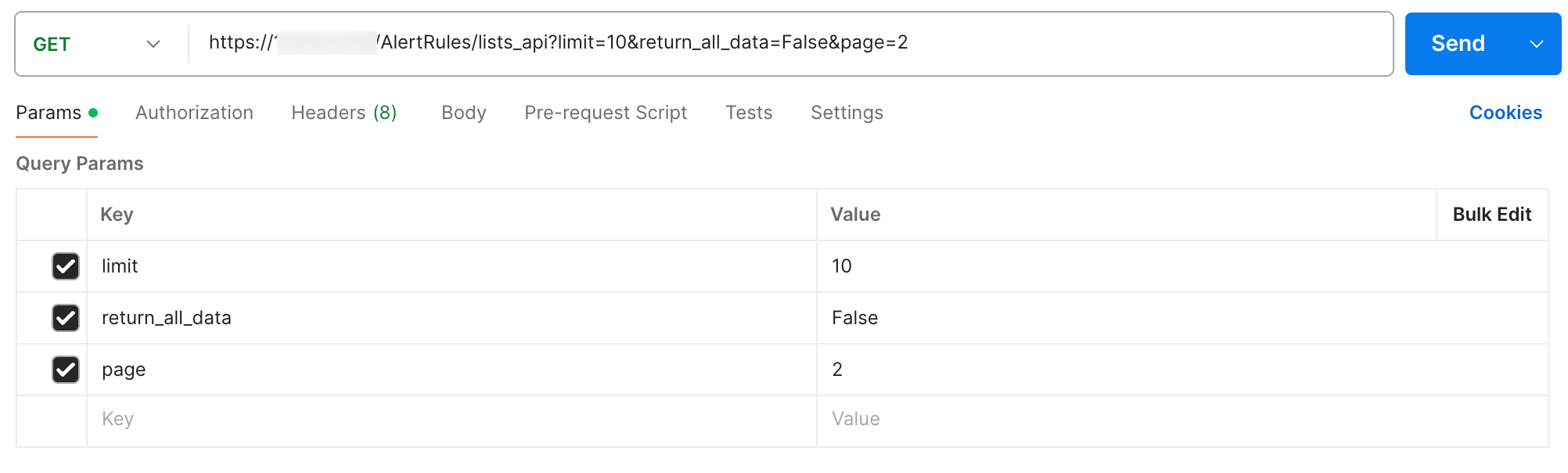
Getting Alert Rule IDs using Postman
Success Response:
{
"rows": [
    {
    "name": "Alertrule name",
    "active": true,
    "description": "string",
    "id": "681b450d7df224cfd8c3d740",
    "user": "admin",
    "cloud_rule_id": "2be16878-9f95-43vd-713t-46878244983e"
    }
],
"total": 10
}
To view alert rules, use AlertRules/read_api.
Endpoint URL
https://Logpoint-IP/AlertRules/read_api
Method
GET
Request Header
Authorization = Bearer <TOKEN>
Parameters
Parameters are data sent with the API request. You must include them in parameters as Key and Value. Add the following parameters to list the Alert Rules:
Field |
Type |
Description |
|---|---|---|
id |
string |
Id of the created Alert Rule. Get the list of ids from Listing Alert Rules. Mandatory Field. |
Request Example:
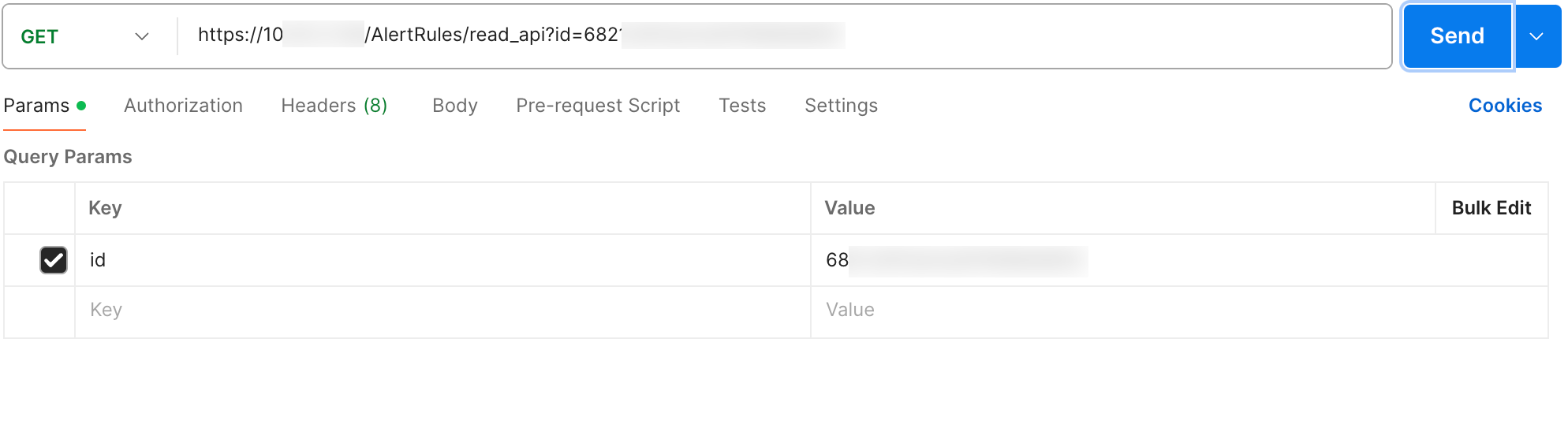
Getting Alert Rule IDs using Postman
Success Response:
{
    "data": {
        "search_params": {
        "query": "string",
        "timerange_day": 0,
        "timerange_hour": 0,
        "timerange_minute": 0,
        "repos": [
            "127.0.0.1:5504/_logpoint"
        ],
        "limit": 100,
        "flush_on_trigger": false,
        "search_interval_minute": 10,
        "delay_interval_minute": 0,
        "throttling_enabled": false,
        "throttling_field": "",
        "throttling_time_range": 0
        },
        "incident_condition": {
        "condition_option": "greaterthan",
        "condition_value": 0,
        "risk": "low",
        "aggregate": "max"
        },
        "taxonomy": {
        "attack_tag_hashes": [],
        "logsources": [],
        "metadata": [
            {
            "field": "string",
            "value": "string"
            }
        ]
        },
        "incident_ownership": {
        "assignee": "string",
        "visible_to_usergroups": []
        },
        "incident_display_data": {
        "apply_jinja_template": false,
        "simple_view": false,
        "jinja_template": ""
        },
        "foureyes": {
        "original_data": false
        },
        "name": "string",
        "description": "",
        "active": true,
        "alert_id": "string",
        "alertrule_unique_id": "string",
        "notifications": [],
        "rbac_config": [],
        "user": "string",
        "vid": "string",
        "cloud_rule_id": "2be17875-5c97-43fd-813c-46638244983e"
    }
}